
Chapter 1 - An Intro to IIP
Downloading Your FSG
Using the iComply2 Compliance Hub, you can download your FSG to be provided to your clients
Step 1: Open the Compliance Hub
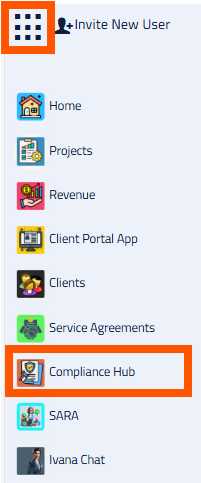

Open the Apps Menu in the top left corner, and click on the Compliance Hub.
This will open the Compliance Hub App in a new tab.
Step 2: Download FSG
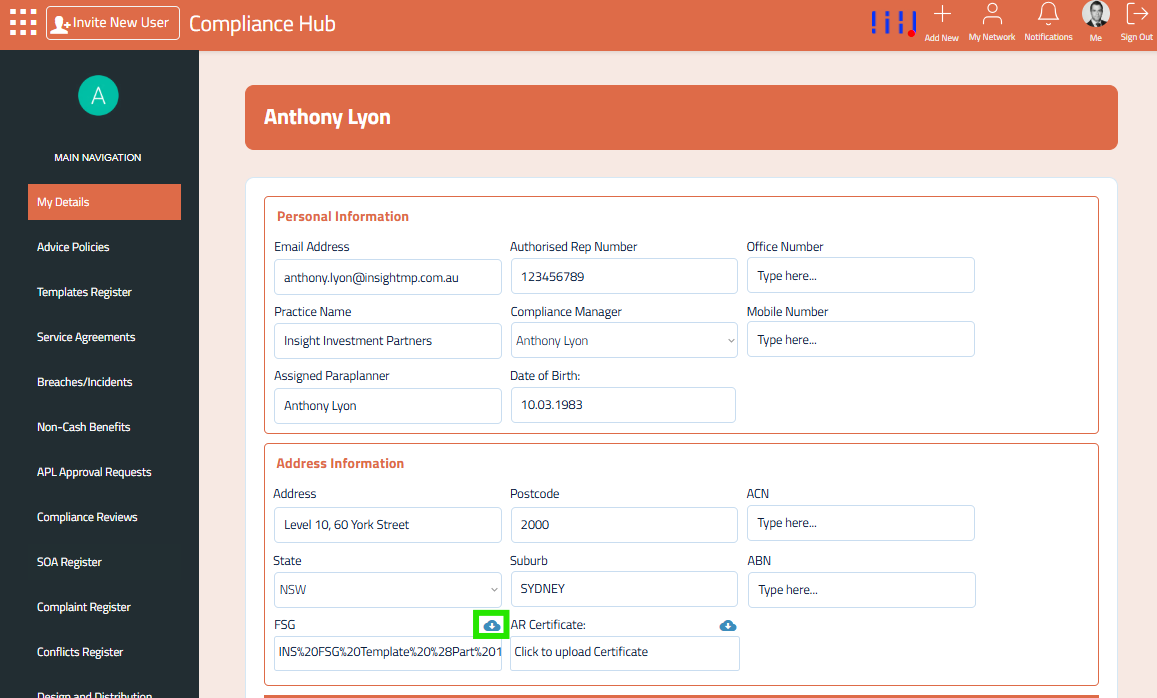
From the My Details section, click the download icon in the FSG section.
This will download a copy of your latest FSG to your device.
Using Website Disclosure Information (WDI)
Website Disclosure Information (WDI) means the statements and information that a providing entity is required to include in an FSG, are made available on its website.
As a providing entity, you can publish your FSG on your website as WDI. The WDI can appear on different pages of a providing entity’s website and include written or graphic information. It can also be made available in a variety of formats, such as a PDF or Word file.
You can download your FSG and have it accessible in your website as WDI.
Your can refer to Chapter 8, Lesson 1 - Website Disclosure Information for more info on using WDI on your website. Click the link below to access the lesson:
Lesson 1 - Website Disclosure Information - IIP Dealer Group